
When I started preparing for the Salesforce Agentforce Specialist certification, I realized something important. Reading Trailhead modules and following projects inside Agentforce Builder Studio helped me complete the tasks, but I was still missing the big picture.
I often asked myself:
“How do all these parts — topics, actions, instructions, and prompts — actually work together when someone chats with the agent?”
If you are in the same boat, this article is for you. I am not writing this as an expert, but as someone learning and documenting the journey. If you notice anything that could be improved or clarified, please share feedback. My goal is to make this easier for anyone trying to understand how Agentforce fits together.
Before We Begin
Agentforce is Salesforce’s framework for creating AI-powered agents that can reason, fetch information, and perform actions in your Salesforce environment.
When a user sends a message, Agentforce:
1. Understands what the user is asking (reasoning)
2. Retrieves the right data (actions)
3. Builds a grounded prompt for the model (prompt generation)
4. Returns a safe and validated response (output governance)
All of this happens within Salesforce. Only the model call to the LLM happens outside, protected by the Einstein Trust Layer.
What Agentforce Does
Agentforce is Salesforce’s framework for creating AI-powered agents that can reason, fetch information, and perform actions in your Salesforce environment.
When a user sends a message, Agentforce:
1. Understands what the user is asking (reasoning)
2. Retrieves the right data (actions)
3. Builds a grounded prompt for the model (prompt generation)
4. Returns a safe and validated response (output governance)
All of this happens within Salesforce. Only the model call to the LLM happens outside, protected by the Einstein Trust Layer.
Step-by-Step: What Happens When You Ask a Question
Imagine a user says:
“Where is my order?”
Let’s look at what happens behind the scenes.
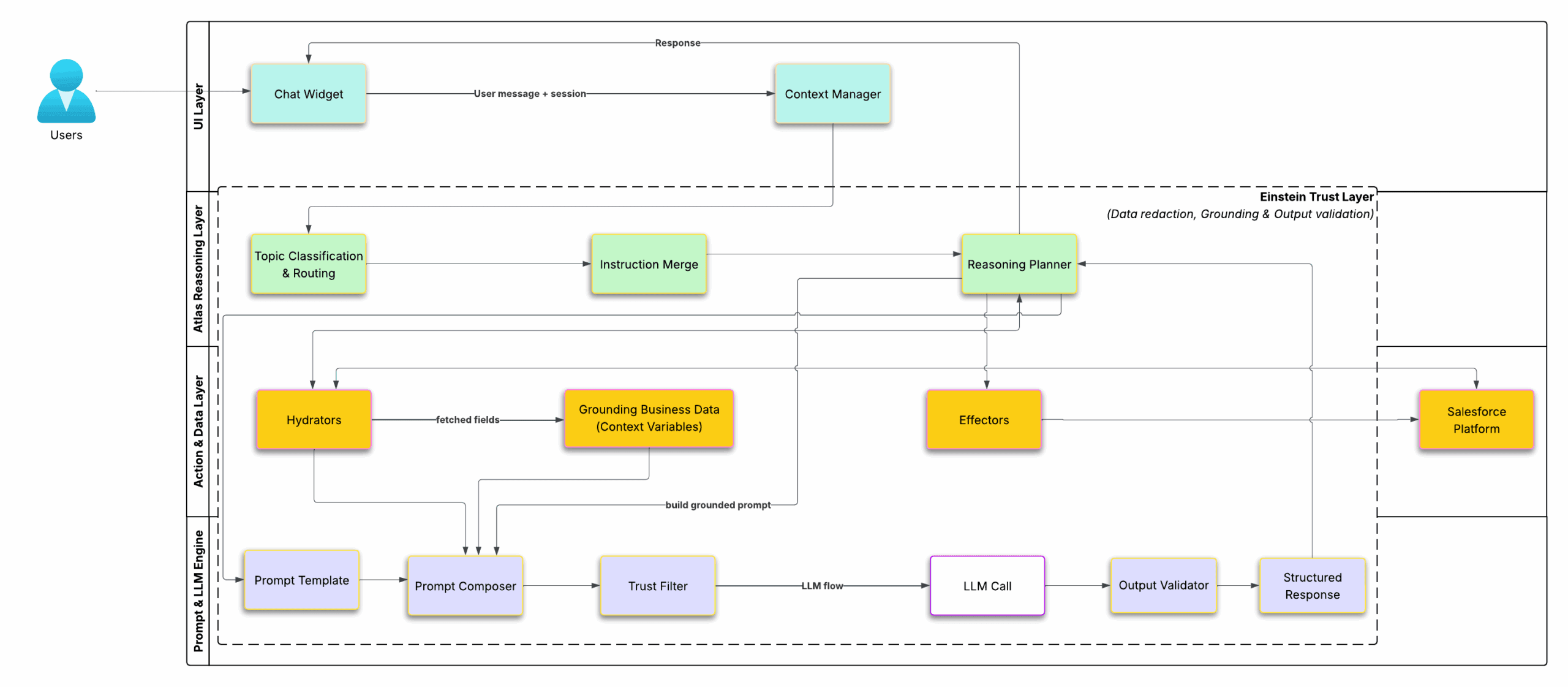
Figure 1 — Agentforce end-to-end architecture.
The diagram above shows how a message moves through different layers of Agentforce — from the chat widget to the Atlas reasoning engine, data fetch actions, prompt generation, and finally through the Einstein Trust Layer for validation and safety.
Color Key:
Cyan = UI Layer, Green = Atlas Reasoning, Amber = Actions & Data, Purple = Prompt & LLM Engine, Dashed Frame = Einstein Trust Layer.
Layer 1: User Interface (Cyan)
This is where everything begins. The user types a message into the chat widget or another connected channel like Slack or Service Cloud Messaging.
Behind the scenes, the Context Manager tracks the conversation. It ensures that follow-up questions like “What about the second one?” make sense in context.
If you are building an agent, you can simulate this part using the Test Chat panel inside Agentforce Builder Studio. It lets you type questions and see how your agent responds without deploying it publicly.
Layer 2: Atlas Reasoning Layer (Green)
This is where the Atlas Engine takes over — the thinking part of Agentforce. The Atlas Reasoning Engine itself uses a specialized LLM under the hood to interpret the user’s intent, classify the right topic, merge instructions, and plan the next steps. You can think of it as the agent’s internal “logic brain,” separate from the later LLM call that generates the final text response.
In Agentforce Builder Studio, you create and configure Topics. Each topic represents a task or intent the agent can handle. For example, “Track Order,” “Reset Password,” or “Check Case Status.”
When you open or create a topic, you will see fields like:
– Topic Name and Description — define what this topic handles.
– Classification Description — explains the kind of questions that should trigger this topic. The reasoning engine uses this field heavily during Topic Classification.
– Example Phrases — optional text examples that help improve topic detection.
– Actions Section — where you connect the Flows, Apex, or Integrations that this topic can use.
– Instructions — where you define special guidelines for how the agent should respond when working on this topic.
When the user sends a message:
1. Topic Classification and Routing – Atlas checks the text and picks the most relevant topic.
2. Instruction Merge – Salesforce combines system-level, developer-level, and topic-level instructions.
3. Reasoning Planner – Atlas decides what happens next. It may ask a question, run an action, or use a prompt template.
You can sometimes see this reasoning process in the trace view when you test your agent. It shows which topic was selected and which actions were called.
Layer 3: Action and Data (Amber)
Once Atlas knows what data it needs, it uses Actions that you linked to the topic earlier. Each action is either a Hydrator (pre-LLM) or an Effector (post-LLM).
Hydrators fetch data before the LLM call — for example, “Get Order Details” or “Fetch Case Notes”. These can be Salesforce Flows, Apex classes, or integrations.
The returned data becomes part of Grounded Business Data, also called context variables. These are the values that get merged into the prompt so the model can use real Salesforce data.
Effectors are actions that happen after the LLM call — for example, “Update Case” or “Send Password Reset”. They are also built using Flows or Apex.
All of these actions run directly inside Salesforce, powered by your org’s data and permissions.
Layer 4: Prompt and LLM Engine (Purple)
This is where your agent’s language generation happens.
You create Prompt Templates in Prompt Builder. Each template defines a reusable structure, such as:
You are a helpful service agent.
Customer {{Customer.Name}}’s order {{Order.Number}} status is {{Order.Status}}.
Expected delivery: {{Order.ExpectedDelivery}}.
When Atlas calls this template:
1. The Prompt Composer fills in the variables.
2. The Trust Filter removes or masks sensitive data.
3. The LLM Call sends the cleaned prompt to the model.
4. The Output Validator checks that the model’s reply meets tone and safety rules.
5. The Structured Response is passed back to Atlas.
In Prompt Builder, you can also connect templates to Generation Fields to fill a field automatically in Salesforce, such as generating a case summary.
Einstein Trust Layer
Everything from the hydrators to the LLM call runs inside the Einstein Trust Layer. It is Salesforce’s governance system for AI and ensures that:
– Sensitive data is redacted before leaving Salesforce.
– Prompts are grounded in Salesforce data.
– Model outputs are validated for safety and compliance.
– All activity is logged for auditing.
Response to the User
Atlas merges the structured response, executes any post-LLM actions, and sends the validated answer back through the Context Manager. The user then sees a clean, accurate response in the chat widget.
Why This Architecture Matters
1. Security and Trust – No sensitive data leaves Salesforce unprotected.
2. Grounded Accuracy – Answers come from real Salesforce data, not guesses.
3. Declarative Power – Admins and builders can design logic using Flows, Actions, and Prompt Templates without writing much code.
4. Governance – The Einstein Trust Layer ensures every AI call is tracked, redacted, and validated.
Wrapping Up
Agentforce is not just an LLM sitting inside Salesforce. It is a complete framework that:
– Uses Atlas to reason and plan,
– Uses Hydrators and Effectors to fetch and act on Salesforce data,
– Uses Prompt Builder to generate grounded and reusable prompts, and
– Relies on the Einstein Trust Layer to keep everything secure.
Once you understand how these layers connect, creating and debugging agents becomes much easier. It also makes studying for the Agentforce Specialist exam more meaningful because you can picture what is really happening behind every chat response.
If you notice any errors or think of ways to improve this explanation, please share your feedback. I am still learning, and I would love to keep refining this with your help.
For more detailed and official information, including examples and configuration references, check Salesforce’s own Agentforce Guide.